 Watt2Ride
How to check a charging point is worth the detour
September 29, 2026
There's a scene every e-bike rider has lived through at least once, and nobody wants to live through again. The battery starts dropping faster than expected, a charging point pops up on the map a couple of kilometres off your route and, full of hope, you decide to make the detour. You pedal, you search, you take a wrong turn, you double back, and at last you arrive. Only to find yourself staring at a locked gate. Or the point is there all right, but the one marked as free on the map wants a card you don't have and didn't even know existed. Or, worse still, the socket simply isn't there any more, gone along with the café that used to host it. Frustrating, isn't it? Especially when you paid for those extra kilometres with the charge you needed to get home, and now you have to ride the same road back with even less than before.
No map in the world can guarantee one hundred percent that everything will be exactly as you expect. Things change, places close, owners change their minds. But the details panel of every point on Watt2Ride holds plenty of useful clues, and learning to read them lets you decide in a few seconds whether the detour is worth it or whether you're better off pressing on to the next option. In this post we'll walk you through what to look at, what each piece of information really means, and why some of it deserves a pinch of healthy scepticism. We'll also show you how, with a small gesture that takes less than a minute, you can make the map a little more reliable for whoever passes that way after you.
The fee badge: read it carefully
The first thing that catches your eye when you open a point's details is the fee badge. It can say Free, Paid or Fee unknown. It looks like the simplest piece of information there is, and in a way it is, but it's worth knowing where it comes from so you can read it properly. Watt2Ride's points are based on OpenStreetMap, the huge collaborative map built and updated every day by thousands of volunteers around the world, plus the reports from our own community. So the badge reflects whatever the last person to map that spot recorded. If they passed by last week, you can trust it fairly comfortably. If the information goes back a few years, something may well have changed in the meantime.
That's why "Fee unknown" deserves special attention. Lots of points, especially small cafés, trattorias or bike shops that offer a socket to their customers, carry this label simply because nobody has got round to adding the information yet. Don't read it as "probably free", but don't read it as "definitely paid" either. It just means nobody has confirmed it so far, so you'll find out when you get there. In the vast majority of cases all it takes is asking nicely at the counter, maybe while ordering a coffee or a drink, and they'll point you to the socket with a smile. Still, it's good to know beforehand, especially if you're counting on that point to get home and have no alternatives nearby.
Data completeness: how far to trust the location
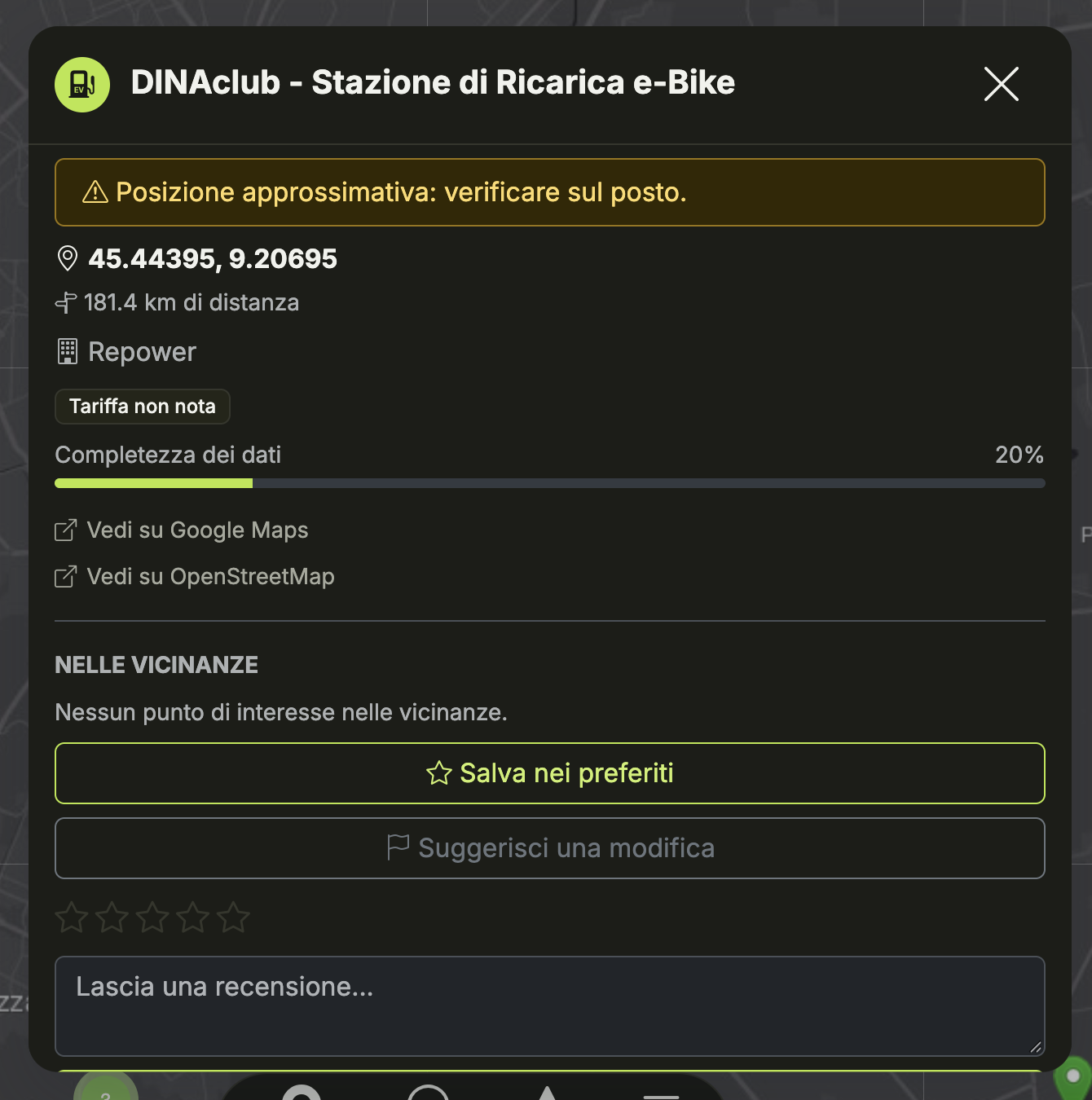
Just below the badge you'll find a Data completeness bar, together with a percentage. It gives a rough idea of how much information has been filled in for that point: the address, the operator, the opening hours, the socket type and so on. It's a bit like someone's social media profile: the more complete it is, the more it suggests somebody is looking after it. In the same way, a point with high completeness is described in detail, and it's more likely that someone has visited recently to keep it up to date.
Be careful not to jump to conclusions, though. A point stuck at 20% isn't necessarily wrong or abandoned. It may be perfectly real and working, just mapped in a hurry by someone who only had time to note "there's a socket here". That said, it's a little more likely to have an inaccurate or outdated address. And if whoever mapped it flagged that the location still needs checking, the panel tells you clearly with a yellow warning: approximate location, please verify on site. In all of these cases the View on Google Maps and View on OpenStreetMap links come in handy, letting you compare the point on another map, look at photos of the area and see whether the pin really matches a café, a square or an actual building. It's a check that takes a few seconds, and it's well worth doing when the point is far away and a mistake would cost you a good chunk of range.

Reviews and surroundings: a break, not just a charge
Scroll down the panel and you'll also find reviews left by other riders, with their star ratings and a few words about how it went. Not every point has them, especially in quieter areas, but when they're there they're worth their weight in gold. They tell you things no tag on a map ever could: whether the owner is welcoming or gives you a funny look when you ask about the socket, whether there's somewhere sensible to lean the bike, whether the coffee is good, whether it's the kind of place you'd happily stop at even without needing a charge. And if you've got something to share after your own stop, leaving a couple of lines and a few stars is the best way to return the favour to whoever comes next.
Then there's the Nearby section, which might just be our favourite. It lists the points of interest around the charger: cafés, restaurants, shops, places to stretch your legs. If nothing shows up, it doesn't necessarily mean the area is a desert. More often it just means nobody has mapped the surroundings carefully yet. When the list is full, though, it completely changes what the stop means. Instead of spending half an hour standing next to the socket watching the percentage creep up one point at a time, you can grab a coffee, eat a sandwich, wander round the village centre or sit on a bench in the sun while the bike does its thing. And a detour that takes you somewhere lovely to stop isn't really a detour any more: it becomes one of the best parts of the ride.
Save it, or help us fix it
Found a point you like? Save it to your Favorites. It's really handy for charging stops along your regular route, for a stage you'll pass again on a multi-day trip, or simply for that café where they welcomed you with a smile and you've already decided you'll be back. All you need is a registered account, and next time you're in the area you'll find it with one tap, instead of searching the map all over again while you're on the bike with your gloves on.
And if something doesn't add up? The address is wrong, the place has closed, the opening hours have changed, the fee doesn't match what's shown? Here's where we'd ask you a small favour. Instead of just avoiding that point and moving on, use the Suggest an edit button. Write a couple of lines about what you found, the report comes straight to us and we check it before updating the map. It takes less than a minute, maybe while you're waiting for the battery to charge somewhere else, but it's exactly how a map becomes genuinely reliable: a point marked "Fee unknown" today can become, thanks to your report, a clear and verified point for the next rider facing the very same choice.
Because in the end, that's what Watt2Ride is all about. A map is only as good as the people who use it and improve it day after day. And fifteen seconds spent reading a point's details carefully can save you pointless kilometres, a fair amount of stress and, with a bit of luck, turn a forced stop into one of the nicest breaks of your day.